Aryan Pariyar
Quick answer: vibe coding is safe enough to build with, but not safe enough to ship without checking. AI tools write code that works, and in Veracode's tests about 45% of AI-generated code still had a security flaw. The same mistakes keep leaking real data: database permissions left off, secret keys shipped to the browser, login checks missing on API routes and forms that anyone can abuse. Below are the 12 checks I ran on my own AI-built site, with a copy and paste test and a fix for each, plus the exact prompt to make your AI agent audit itself.
छिटो उत्तर (नेपालीमा): AI (Claude Code, Cursor, Lovable, Bolt) ले बनाएको app चल्छ, तर सुरक्षित नहुन सक्छ। धेरैजसो data leak हुने कारण उस्तै छन्: database को permission (RLS) बन्द, secret key browser मा पुगेको, API मा login check नभएको, र form बाट जसले पनि spam गर्न सक्ने। यो लेखमा मैले आफ्नै वेबसाइटमा चलाएको १२ वटा security check, जाँच्ने तरिका र fix गर्ने code छ। पूरा ३९ पेजको checklist PDF निःशुल्क email मा पाउन सक्नुहुन्छ।
I'm Aryan Pariyar, a web developer in Nepal. I rebuilt this website with AI coding agents: a Next.js front end, a Supabase database, Cloudinary for images, Resend for email and an admin panel, all migrated off WordPress in a few days. It worked. Then I audited it the way an attacker would, and found a Next.js version with a known remote code execution bug, a rate limit anyone could skip with one fake header, a contact form that could be used to flood other people's inboxes, and an escape in my structured data that did nothing at all. Every one of those is fixed now. This post is everything I checked, how I tested it, and what I changed.
Want the whole audit as a checklist?The full 39 page Website Security Audit Checklist has 200+ checks across 18 sections, every test command, the fix code and a ready made prompt for your AI agent. It's free.
Email me the free checklist
Key takeaways
- AI writes code that works, not code that's safe. It rarely threat-models your app unless you ask it to.
- Most vibe-coding breaches are configuration mistakes, not clever hacks: database permissions off, storage left public, keys in the browser.
- Test the live site, not just the code. Half of my findings only showed up when I attacked the running website.
- Login checks belong on every server action and API route, and in the database itself. Middleware alone has been bypassed before.
- Anything that sends email or calls a paid API needs a limit that can't be skipped by faking an IP address.
- Old systems are the easiest way in. A migration isn't finished until the old CMS is shut down.
What is vibe coding, and why do vibe-coded apps leak?
Vibe coding means building software by describing what you want to an AI, accepting most of what it writes, and steering by results rather than by reading every line. Tools like Claude Code, Cursor, Lovable, Bolt, Replit and v0 make it possible to ship a working app in a weekend. That speed is real, and I use these tools every day.
The problem is what "working" means. When you ask for a sign-up form, the AI checks that the form signs people up. It doesn't, unless asked, check what happens when someone skips the form and calls your database directly, sends a 50 MB body, fakes their IP address or pastes a script into their name. Security is mostly about the requests nobody makes in a demo.
The numbers back this up. Veracode tested over 100 language models on 80 coding tasks and found that AI-generated code introduced a security flaw in about 45% of tasks, and only 12 to 13% of the code was safe against cross-site scripting (SD Times on Veracode, 2025). Their 2026 follow-up found the average security pass rate stuck at about 56%, almost unchanged in a year, even though nearly all the code compiled (SD Times, July 2026). Models got much better at writing code that runs. They didn't get much better at writing code that's safe.
Is vibe coding safe? What real incidents show
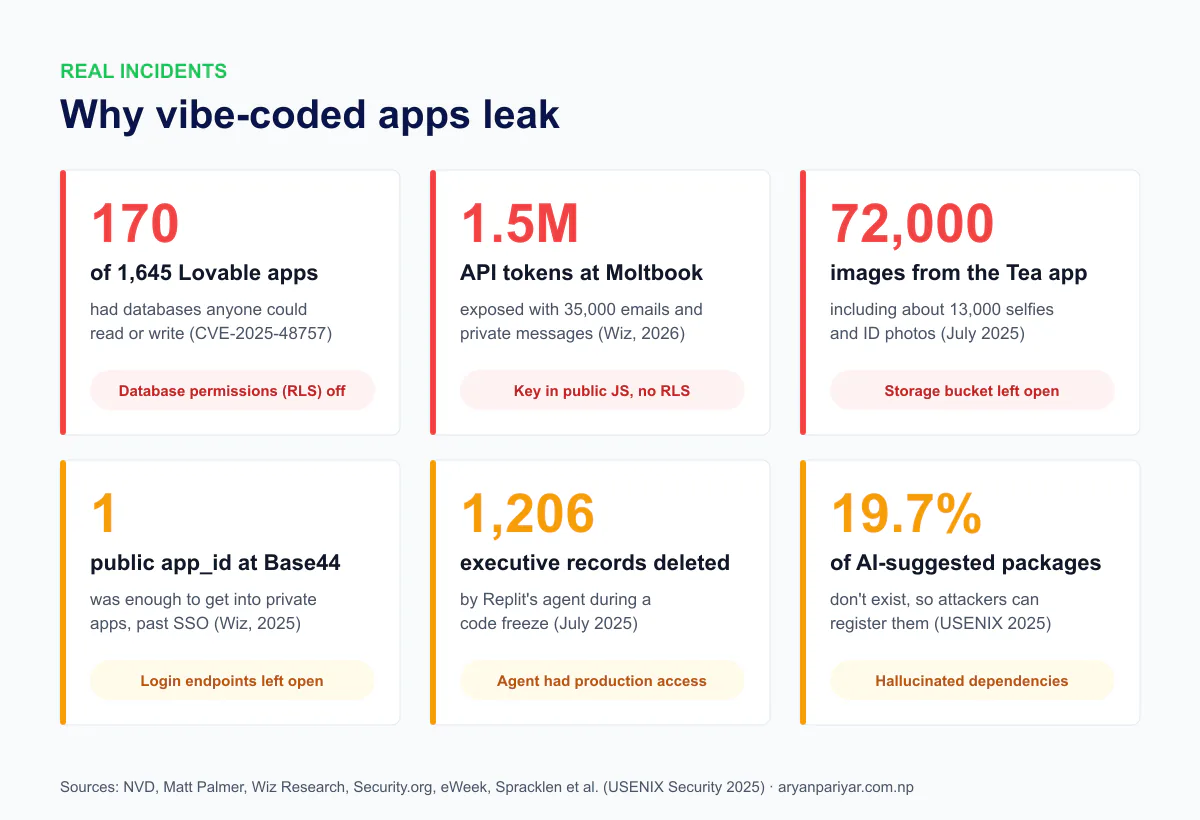
| Incident | What happened | The mistake | The lesson |
|---|---|---|---|
| Lovable apps, CVE-2025-48757 | A researcher scanned 1,645 apps from Lovable's showcase and found 170 whose Supabase tables could be read or written with just the public key (CVE record) | Row Level Security missing or too broad | Test your database as a logged-out stranger |
| Moltbook, 2026 | Wiz found a Supabase key in the site's JavaScript with no RLS behind it: 1.5 million API tokens, 35,000 emails and private messages exposed (Wiz) | Public key plus no database permissions | The public key is only safe if RLS is on |
| Tea app, July 2025 | About 72,000 images, including around 13,000 selfies and ID photos, sat in a storage bucket anyone could open (Security.org) | Storage permissions left open | Check storage buckets, not just tables |
| Base44, July 2025 | Two sign-up and code-check endpoints had no restrictions, so the public app ID was enough to get into private apps, even ones behind SSO (The Hacker News) | Auth endpoints left unprotected | Every endpoint needs its own check |
| Replit agent, July 2025 | During a code freeze, an AI agent ran destructive commands and wiped a production database with records on 1,206 executives (eWeek) | The agent had production access | Keep agents away from production data |
| Next.js CVE-2025-29927 | One request header let attackers skip middleware entirely on self-hosted Next.js, rated 9.1 out of 10 (Fastly) | Login checks only in middleware | Check permissions next to the data too |
None of these needed a genius attacker. Most were found by someone opening the browser's developer tools or calling an API with curl. That's good news: the same simple tests find them in your app before anyone else does.
The vibe coding security checklist: 12 checks
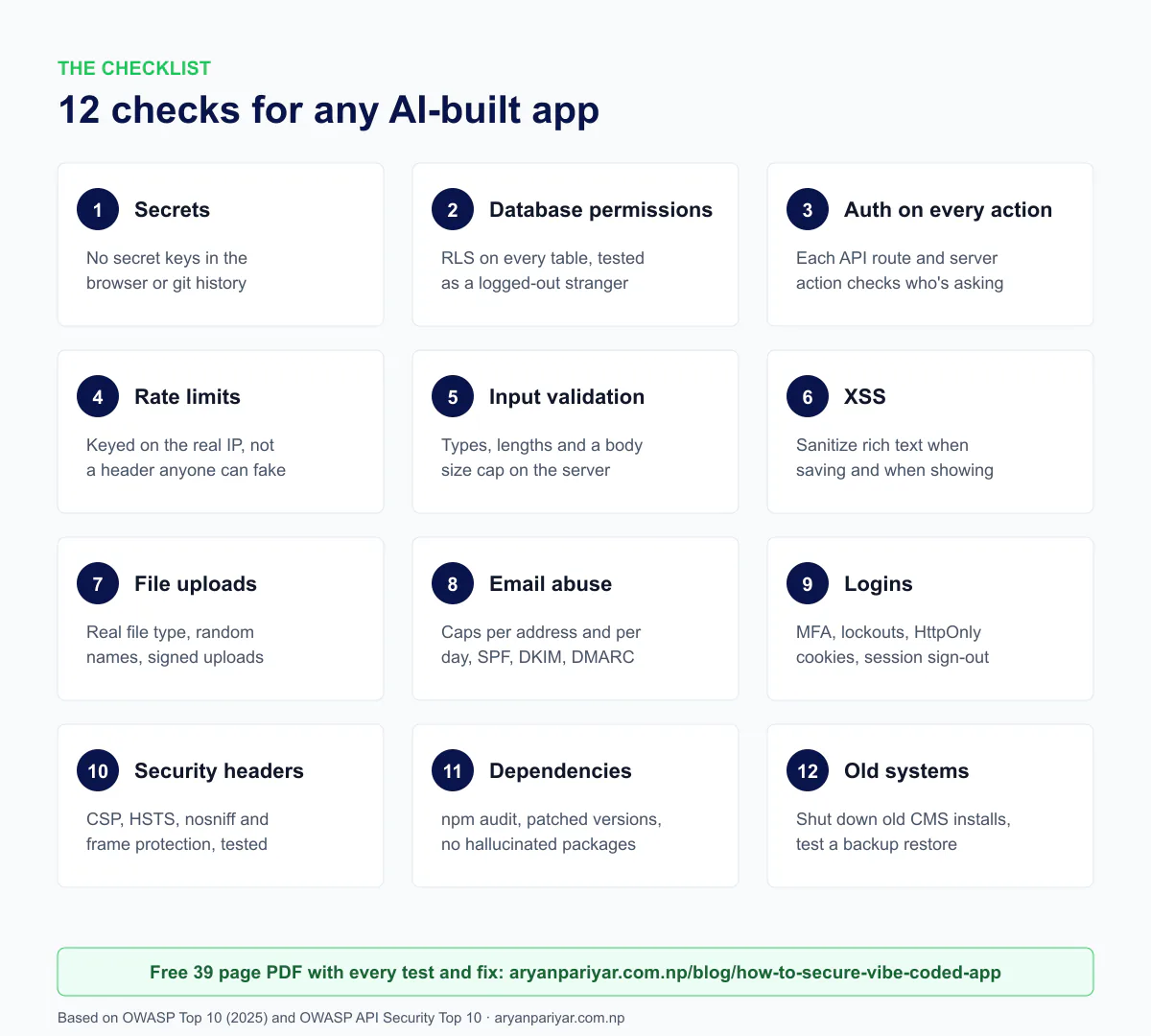
Each check below has three parts: what goes wrong, a test you can run right now, and the fix. The tests use curl, which works in any terminal (Git Bash on Windows). Set your site once: SITE=https://yoursite.com. Only test sites you own.
1. Secrets: nothing private in the browser or in git
What goes wrong: the AI puts a secret key where the browser can see it. In Next.js, any variable starting with NEXT_PUBLIC_ is sent to every visitor. In Vite it's VITE_. If your database secret, Stripe secret, OpenAI key or email API key ends up there, anyone can copy it from your JavaScript.
Test: build the app, then search the files that go to the browser for every secret value in your .env file. This script prints only the variable names, never the values:
// scan-secrets.mjs (Next.js: run after npm run build)
import fs from "node:fs"; import path from "node:path";
const env = Object.fromEntries(fs.readFileSync(".env.local", "utf8").split(/\r?\n/)
  .filter((l) => l.includes("=") && !l.startsWith("#"))
  .map((l) => [l.slice(0, l.indexOf("=")), l.slice(l.indexOf("=") + 1).replace(/^"|"$/g, "")]));
const secrets = Object.entries(env).filter(([k, v]) => !k.startsWith("NEXT_PUBLIC_") && v.length >= 12);
const files = []; (function walk(d) { for (const f of fs.readdirSync(d)) { const p = path.join(d, f);
  fs.statSync(p).isDirectory() ? walk(p) : files.push(p); } })(".next/static");
let leaks = 0;
for (const [k, v] of secrets) for (const f of files)
  if (fs.readFileSync(f, "utf8").includes(v)) { leaks++; console.log("LEAK:", k, "in", f); }
console.log(`checked ${secrets.length} secrets in ${files.length} files, leaks: ${leaks}`);
Then check your git history, because deleting a key from the code doesn't delete it from old commits: git log -p --all | grep -cE "service_role|sb_secret_|sk_live_|api_secret" should print 0. A tool like gitleaks does this more thoroughly. Finally, make sure your .env file isn't downloadable: curl -s -o /dev/null -w "%{http_code}" $SITE/.env should not print 200.
Fix: keep secrets in server-only code (in Next.js, add import "server-only" at the top of the file that reads them). If a secret was ever in the browser, in git, in a screenshot or pasted into a chat, rotate it: create a new one, deploy, then delete the old one and confirm it no longer works.
On my site: 12 secret values checked against the built files and the live JavaScript, 0 leaks. Git history clean. I still rotated one secret that had been shared during setup, then proved the old one returned 401.
2. Database permissions: test as a logged-out stranger
What goes wrong: with Supabase and Firebase, the browser talks to the database directly using a public key. That's by design, and it's safe only if the database itself decides who can read and write each row. In Supabase that's Row Level Security (RLS). If a table has RLS off, or a policy like using (true) on writes, the public key opens it to everyone. This is the Lovable and Moltbook mistake.
Test: act as an anonymous attacker with your public (anon or publishable) key, the one already in your JavaScript. Try to read private data, and try to write, update and delete:
K=your_public_anon_key; U=https://yourproject.supabase.co/rest/v1
curl -s "$U/profiles?select=*" -H "apikey: $K"                    # private data? expect []
curl -s -X POST "$U/admins" -H "apikey: $K" -H "Content-Type: application/json" \
  -d '{"user_id":"00000000-0000-0000-0000-000000000001"}'          # expect error 42501
curl -s -X PATCH "$U/posts?id=eq.1" -H "apikey: $K" -H "Content-Type: application/json" \
  -H "Prefer: return=representation" -d '{"title":"hacked"}'        # expect [] or 42501
curl -s -X DELETE "$U/orders?id=gt.0" -H "apikey: $K" -H "Prefer: return=representation"  # expect []
One trap I nearly fell into: use realistic rows with every required column filled in. If your test row is missing a required field, the database rejects it for that reason, and you'll think RLS protected you when it didn't. In the SQL editor, list every table and whether RLS is on:
select c.relname as table_name, c.relrowsecurity as rls_on
from pg_class c join pg_namespace n on n.oid = c.relnamespace
where n.nspname = 'public' and c.relkind = 'r' order by 1;

-- policies that let everyone write are a red flag
select tablename, policyname, cmd from pg_policies
where schemaname = 'public' and (qual = 'true' or with_check = 'true');
Fix: turn on RLS for every table, then add the narrowest policy that works, for example using (auth.uid() = user_id) so people only see their own rows. Never trust a user_id or role sent from the browser. Also check storage buckets (the Tea mistake) with curl -s "https://yourproject.supabase.co/storage/v1/bucket" -H "apikey: $K", and turn off public sign-ups if your app doesn't need them. Supabase's RLS guide has policy examples.
On my site: RLS was on everywhere, and every anonymous write was refused with error 42501, including an attempt to add myself to the admins table. Drafts, scheduled posts and password hashes weren't readable. I still tightened the grants (see the takeaway below), so that if a policy is ever wrong, a second layer still says no.
Second layer, least privilege: the anonymous role should only be allowed to read. In Supabase, run revoke insert, update, delete on all tables in schema public from anon; plus revoke truncate, trigger, references on all tables in schema public from anon, authenticated;. Then RLS isn't your only line of defense.
3. Every action checks who's asking
What goes wrong: the AI hides the admin button for normal users and calls it done. But hiding a button isn't security. Anyone can call your API route or server action directly. In Next.js, a Server Action is a public endpoint with a hidden URL, not a private function. And login checks that only live in middleware can be skipped: CVE-2025-29927 let one header bypass Next.js middleware entirely.
Test: while logged out, request every admin page and call every API route. Then open each file that has "use server" and read the first line of every exported function. It should be your auth check.
for p in /admin /admin/users /admin/settings /api/admin/export; do
  curl -s -o /dev/null -w "%{http_code} $p\n" $SITE$p; done      # expect 307/401/403, never 200 with data
grep -rn "export async function" src --include=actions.ts       # then read each one
Fix: one shared guard, called at the top of every protected action, route and admin page. This is the one on my site, using Supabase:
export const requireAdmin = cache(async () => {
  const db = await sessionDb();
  const { data: { user } } = await db.auth.getUser();   // checked with the auth server
  if (!user) redirect("/admin/login");
  const { data: aal } = await db.auth.mfa.getAuthenticatorAssuranceLevel();
  if (aal?.nextLevel === "aal2" && aal.currentLevel !== "aal2") redirect("/admin/login/verify");
  const { data: ok } = await db.rpc("is_admin");        // the database decides
  if (!ok) { await db.auth.signOut(); redirect("/admin/login?error=denied"); }
  return { db, user };
});
Use getUser() on the server, not getSession(), because getUser() checks the token with the auth server instead of trusting the cookie. And keep the database rules from check 2, so even a forgotten guard can't leak data.
4. Rate limits that can't be skipped
What goes wrong: login forms, contact forms and anything that calls a paid API need a limit, or bots will guess passwords, spam you and run up your bill. AI usually adds one when asked. But many rate limiters key on the first entry of the X-Forwarded-For header, and that entry is whatever the visitor typed. Send a different fake IP with every request and the limit never triggers.
Test: send a few more requests than your limit allows, each with a different fake IP. If you never get a 429, the limit can be bypassed:
for i in 1 2 3 4 5 6 7; do
  curl -s -o /dev/null -w "%{http_code} " -X POST $SITE/api/contact \
    -H "Content-Type: application/json" -H "X-Forwarded-For: 10.0.0.$i" \
    -d '{"name":"Test","email":"you@example.com","message":"limit test"}'
done; echo        # expect 429 once you pass the limit
Fix: your proxy adds the address it saw to the end of the header, so use the last entry (or the header your host or CDN sets, like cf-connecting-ip on Cloudflare):
export async function clientIp() {
  const h = await headers();
  const chain = (h.get("x-forwarded-for") ?? "").split(",").map((s) => s.trim()).filter(Boolean);
  return chain.at(-1) || h.get("x-real-ip") || "unknown";
}
On my site: this was real. My limiter used the first entry, and the live test above never hit a limit. After the fix, the same test returned 429 on the 6th request. An in-memory limiter works per server process, so if you run several instances, move the counts to Redis or Upstash.
5. Validate input on the server, and cap the size
What goes wrong: the browser checks that the email looks like an email, so the AI assumes the server gets clean data. It doesn't. Attackers skip the form and send objects instead of strings, huge bodies, extra fields like "role":"admin", or line breaks that break email headers.
Test:
# 1 MB body with no Content-Length header: does the server still stop it?
head -c 1000000 /dev/zero | tr '\0' a | curl -s -o /dev/null -w "%{http_code}\n" -X POST $SITE/api/contact \
  -H "Content-Type: application/json" -H "Transfer-Encoding: chunked" --data-binary @-   # expect 413
# wrong content type, and wrong types
curl -s -o /dev/null -w "%{http_code}\n" -X POST $SITE/api/contact -H "Content-Type: text/plain" -d 'x'   # expect 415
curl -s -X POST $SITE/api/contact -H "Content-Type: application/json" -d '{"name":{"a":1},"email":["x"]}'  # expect 400/422
Fix: accept only the content type you expect, read the body with a hard size cap (one that works even without a Content-Length header), and build database rows from an explicit list of fields. Never save the request body as it is, that's called mass assignment.
const row = {
  name: line(body.name, 120),            // string, no control characters, max length
  email: line(body.email, 254).toLowerCase(),
  message: String(body.message ?? "").slice(0, 5000),
};                                       // never: insert(body)
// line() strips \r \n and other control characters, so nobody can inject email headers
const line = (v, max) => (typeof v === "string" ? v : "").replace(/[\u0000-\u001f\u007f]+/g, " ").trim().slice(0, max);
Don't restrict names to A to Z, by the way. Nepali names and other scripts are valid input. Limit length and strip control characters instead.
6. Cross-site scripting (XSS): sanitize when saving and when showing
What goes wrong: this is the category AI handles worst, secure in only 12 to 13% of Veracode's tests. Any time HTML from a database, a CMS or a user is rendered with dangerouslySetInnerHTML or innerHTML, a stored <img src=x onerror=...> runs in your visitors' browsers, and in your admin's.
Test: in a draft or on a staging copy, paste these into every field that ends up on a page (titles, descriptions, rich text, image alt text), then view the page source:
<img src=x onerror=alert(1)>
<svg onload=alert(1)>
<a href="javascript:alert(1)">click</a>
</script><script>alert(1)</script>
Fix: run rich text through an allowlist sanitizer like sanitize-html or DOMPurify, both when it's saved and when it's shown. That second part matters: content you import from an old CMS, or write with a script, never passes through your save function. For JSON-LD structured data, escape < so a title can't close the script tag:
<script type="application/ld+json"
  dangerouslySetInnerHTML={{ __html: JSON.stringify(data).replace(/</g, "\\u003c") }} />
On my site: both problems were real. Posts migrated from WordPress were rendered without sanitizing, because they were inserted by a script. And my first JSON-LD fix used "<" with one backslash, which JavaScript turns straight back into <, so it did nothing. I only caught it by checking the rendered page instead of the code. Lesson: always verify the output.
7. File uploads: check the real file, not the name
What goes wrong: the AI checks that the file name ends in .jpg. Rename shell.php to shell.jpg and it passes. Other common gaps: keeping the original file name (path tricks), no size limit, SVG files that contain scripts, and unsigned upload presets that let anyone upload to your Cloudinary or S3 account.
Test: upload a text file renamed to .png, upload a file over your size limit, try the upload while logged out, and look for unsigned presets in your media provider's settings.
Fix: check the first bytes of the file (PNG starts with 89 50 4E 47, JPEG with FF D8 FF, WebP with RIFF....WEBP), cap the size, generate a random file name, sign uploads on the server, and allow only the formats you need. If you must show SVGs, serve them with Content-Security-Policy: sandbox. My site accepts PNG, JPEG, WebP and GIF only, from logged-in admins only, with random names and zero unsigned presets.
8. Forms that send email: stop them being used as a weapon
What goes wrong: a contact form that sends a "thanks, we got your message" email will send it to whatever address is typed in. A bot can type someone else's address 10,000 times, and your domain becomes the spammer. Your sending reputation drops, and your real emails start landing in spam.
Test: submit the form three times in a row with the same email address. How many emails arrive?
Fix: cap emails per recipient and per day, on top of the per-IP limit. Keep the recipient of notification emails fixed on the server. Set up SPF, DKIM and a DMARC policy of quarantine or reject for your domain, so nobody can send email pretending to be you.
// the auto-reply goes to a stranger's address, so it's capped
if (!limited(`reply:${email}`, 1, DAY) && !limited("reply:all", 200, DAY)) {
  await sendMail({ to: email, subject: "Thanks for reaching out", html: confirmationHtml(name) });
}
On my site: the auto-reply had no cap at all. Now it's one per address per day and 200 a day overall. The visitor sees the same success message either way, so the cap can't be used to find out who already wrote to me.
9. Logins: MFA, lockouts, cookies and sessions
What goes wrong: unlimited password guesses, error messages that reveal which emails have accounts, session cookies that JavaScript can read, no two-step login, and old sessions that stay valid after a password change.
Test: try 6 wrong passwords. Compare the message for a wrong email with the message for a wrong password (they should match). Look at the Set-Cookie header after logging in. Change your password in one browser and see if another browser stays logged in.
Fix: lock out after a few failures (keyed on the real IP, see check 4). Use the same error message for every failure. Set cookies to HttpOnly; Secure; SameSite=Lax. Sign out other sessions when the password changes (signOut({ scope: "others" }) in Supabase). Add two-step verification with an authenticator app, and enforce it on the server, not just in the login screen. On my site the database itself refuses admin access until the code is entered:
create or replace function public.is_admin() returns boolean
language sql stable security definer set search_path = '' as $$
  select exists (select 1 from public.admins where user_id = auth.uid())
    and ( coalesce(auth.jwt() ->> 'aal', '') = 'aal2'
          or not exists (select 1 from auth.mfa_factors f
                         where f.user_id = auth.uid() and f.status = 'verified') );
$$;
Log failed logins too, with the email that was tried but never the password, so you can see an attack in progress.
10. Security headers: test them in a real browser
What goes wrong: most AI-built apps ship with no security headers. Without them, your site can be framed for clickjacking, browsers may guess file types, and a single XSS bug has nothing to stop it.
Test:
curl -sI $SITE | grep -iE "strict-transport|content-security|x-content-type|x-frame|referrer-policy|permissions-policy|x-powered-by"Fix: add Content-Security-Policy, Strict-Transport-Security, X-Content-Type-Options: nosniff, X-Frame-Options: DENY (or frame-ancestors 'none'), Referrer-Policy and Permissions-Policy, and remove X-Powered-By. In Next.js they go in headers() in your config. The catch: a strict CSP can silently break your booking widget, video embeds or analytics. So after adding it, open every type of page in a browser and check the console for "Refused to load" messages. My site went from no headers to the full set with 0 CSP violations across 11 page types, including a Calendly embed and YouTube videos.
11. Dependencies: patched versions, and packages that actually exist
What goes wrong: two problems. First, outdated packages with known holes. Run npm audit and you may find, like I did, that your framework version has a critical advisory. Second, AI invents packages. A USENIX Security 2025 study found 19.7% of AI-recommended packages didn't exist, and 43% of those made-up names came back every time the prompt was repeated (TechRepublic). Attackers register those names with malware inside. It's called slopsquatting.
Test:
npm audit                 # everything
npm audit --omit=dev      # only what ships to production
npm view some-package     # before installing anything the AI suggests: does it exist, who publishes it, how old is it?
Fix: upgrade to the lowest version that fixes each advisory, read the changelog, and build and test on your real hosting before you call it done. Commit your lockfile. Read every npm install line your agent runs, and be suspicious of packages that are brand new or have almost no downloads.
On my site: Next.js 16.2.7 had critical advisories, including remote code execution in the image optimizer for the AVIF and SVG options my site uses. The patched version then failed to build on my host, because the server's system library was older than Next's native compiler needs. The fix was Next's WebAssembly compiler and a JavaScript config file. If I'd only tested on my laptop, the "fix" would have taken the site down.
12. Old systems, backups and logs
What goes wrong: after a migration, the old site often keeps running somewhere: an old WordPress on a subdomain with an old PHP version, a forgotten staging site, an old API key still active. Attackers love these because nobody patches them. Meanwhile there's no tested backup, and nobody would notice an attack in progress.
Test: find every subdomain your domain has ever had a certificate for, at https://crt.sh/?q=%25.yourdomain.com, and open each one. Probe for old CMS paths like /wp-login.php, /wp-json/wp/v2/users and /xmlrpc.php. Check what PHP version they report (see my PHP2Shell guide for why that matters right now).
Fix: back up the old system, then shut it down and revoke its keys. Back up your database on a schedule and test a restore once, because a backup you've never restored is a guess. Log failed logins and admin changes, and keep backups out of your git repository, since they contain personal data.
The risks that are new with AI agents
Everything above applies to any web app. These risks come from the agent itself:
- Agents with production access. The Replit incident happened because the agent could reach the live database. Give agents a development database, read-only tokens where possible, and never your production secrets.
- Prompt injection. An agent reads files, web pages, GitHub issues and tool descriptions, and any of them can carry instructions. Researchers have shown hidden instructions in rules files using invisible Unicode characters, and MCP tool servers whose descriptions tell the agent to read
.envfiles and send them away (Cloud Security Alliance). Only install MCP servers and rules files you trust, and review what the agent wants to run. - Secrets in chat. Don't paste API keys or passwords into an AI chat. Put them in
.envand refer to them by name. If you already pasted one, rotate it. - Unreviewed diffs. Read what changed before you deploy, especially anything touching auth, database rules, environment variables or
package.json.
Copy and paste prompts for your AI agent
The fastest way to use this post is to make your agent do the work. These are the prompts I use with Claude Code. They work in Cursor and other agents too.
Prompt 1: full security audit
You are a senior application security engineer and the lead developer on this
project. Run a complete security audit of this website: the code in this
repository, its database, its third-party services and the live site at
[https://yoursite.com]. I own it and authorize testing of it, and nothing else.
Then fix every issue you safely can, re-test it, and prove each fix.

Rules:
1. Never print secret values. Refer to secrets by variable name only.
2. No destructive tests on production. Attack database writes only as the
   anonymous role (RLS must refuse them), or inside a transaction you roll back.
3. Back up any file or row before editing it, and restore it after testing.
4. Ask me before anything irreversible: deleting sites, data or DNS records,
   rotating keys other systems use, or emailing real people.
5. For vulnerable dependencies, pick the lowest patched version, read the
   changelog, and prove it builds on the real hosting platform.
6. Fix root causes in shared code, one finding at a time, re-testing each.
7. Snapshot every public URL (status, title, meta description, H1, text)
   before and after; the difference must be zero unless intended.
8. Every check gets a status (PASS, FIXED, FAIL needs owner, N/A) and evidence:
   the command you ran and what it returned.

Check, in order: inventory (routes, API handlers, server actions, forms,
uploads, env variable names, tables, policies, DNS, subdomains, old URLs);
secrets in client bundles, live JS, source maps and git history; database RLS,
broad policies, grants, SECURITY DEFINER functions, storage, realtime, sign-up
settings; server-side validation, body size, content type, CRLF, mass
assignment, XSS (stored, reflected, DOM), JSON-LD escaping, open redirects;
uploads (magic bytes, size, random names, signed only); email abuse caps,
SPF/DKIM/DMARC, webhook signatures, SSRF; auth inside every server action and
route, cookie flags, caching of private pages, error disclosure; login lockout
keyed on the real client IP, MFA enforced server-side, session revocation;
API methods, BOLA, CORS; security headers and CSP tested in a real browser;
npm audit and hallucinated packages; old CMS installs, backups, debug files;
privacy and retention; logging of failed logins and admin changes.

Finish with a report: summary first, then every check with status and
evidence, then the actions only I can do, ranked by risk.
Prompt 2: secure by default rules (add to CLAUDE.md, AGENTS.md or .cursorrules)
Security rules for this project:
- Secrets live only in server-only code and .env files. Never in NEXT_PUBLIC_
  or VITE_ variables, never in code, logs, commits or chat.
- Every server action, API route and admin page starts with the shared auth
  guard. Hiding UI is not authorization.
- Every new table ships with RLS enabled and narrow policies in a migration.
  The anon role can only read published data.
- Validate every input on the server: type, length, allowed values. Build rows
  from an explicit field list, never from the request body.
- Rate-limit anything public that writes data, sends email or costs money,
  keyed on the real client IP (last X-Forwarded-For entry from our proxy).
- Sanitize rich HTML on save and on render. Escape < in JSON-LD.
- Before adding a dependency, confirm it exists on npm, is maintained and is
  widely used. Tell me before installing anything new.
- Never connect to or modify the production database. Use the dev database.
- After changing auth, database rules, headers or dependencies, run the
  relevant security tests and show me the output.
Prompt 3: review one feature before it ships
Review the feature you just built as an attacker would. For each endpoint,
action or form it adds: who can call it, what happens if I call it logged out,
as another user, with extra fields, with a 1 MB body, with HTML or script in
every text field, and 20 times a minute from rotating IPs. Show me curl
commands that prove each case is handled, run them, and fix anything that fails.
The full prompt and every test in one PDFPrompt 1 is the short version. The checklist PDF has the full 18 phase prompt, 200+ checks, every test command and the fix code, ready to hand to any AI agent or developer.
Get the free checklist
What I found on my own site, and the fixes
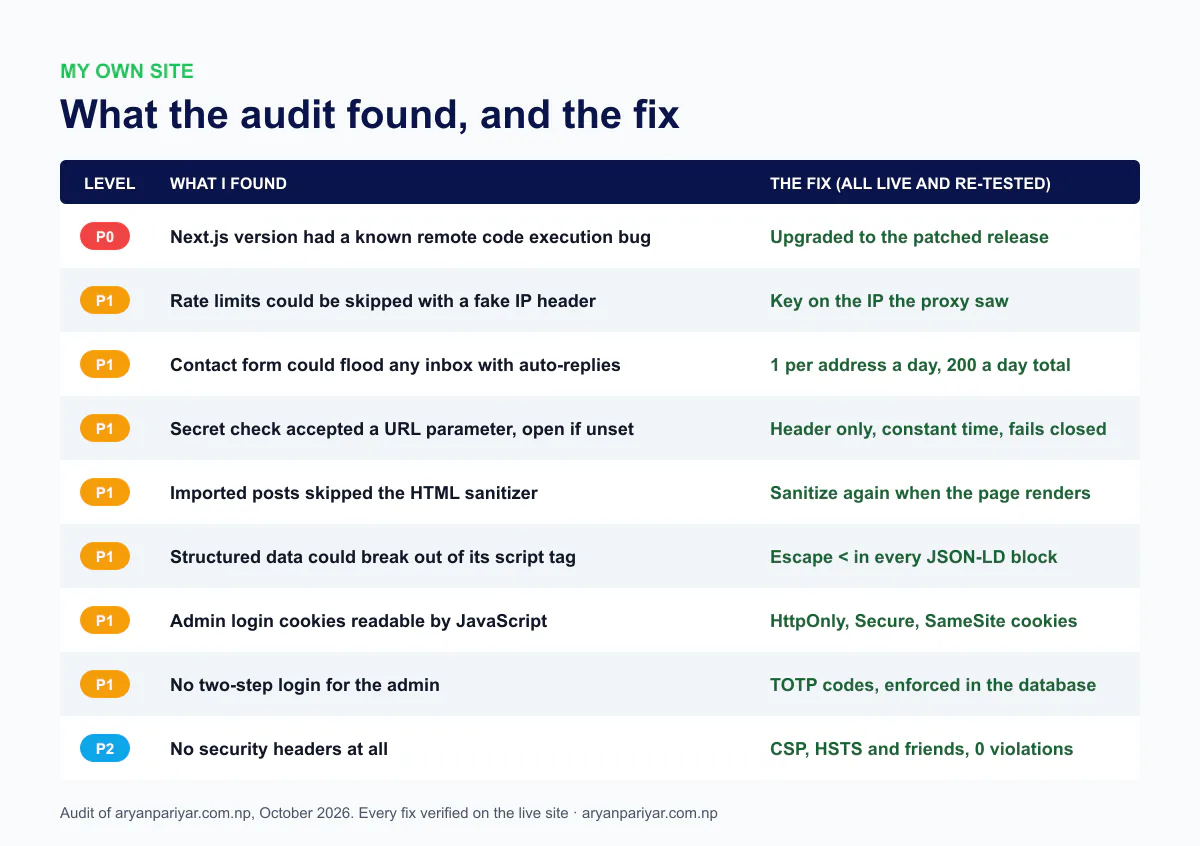
For the record, here's what passed: no secrets in the browser or in git history, RLS on every table with every anonymous write refused, sign-ups off, no public storage buckets, no unsigned upload presets, every server action guarded, and source maps not served. After deploying the fixes, all 68 pages returned 200, the SEO text was identical before and after, and the server logged zero errors.
Problems you'll hit while fixing (and how to get past them)
| Problem | Why it happens | What to do |
|---|---|---|
| The CSP broke a widget or embed | The widget loads scripts or frames from a domain your policy doesn't list | Read the "Refused to load" console message and add exactly that domain to the right directive |
| RLS blocks your own app | The app read data as the anonymous role, which worked only because RLS was off | Add a read policy for published rows, and do private reads on the server |
| The patched version won't build on your host | New framework versions can need newer system libraries than shared hosting has | Check the build log, use the framework's fallback compiler or a newer Node image, or change hosts |
| Everyone shares one rate limit | Behind a proxy, every request seems to come from the proxy's IP | Read the client IP from the header your proxy sets, as in check 4 |
| The sanitizer stripped something you need | Allowlists are strict, mine removed rel="nofollow" from links | Add the exact tag or attribute to the allowlist, then compare page text before and after |
| Emails land in spam | Missing SPF, DKIM or DMARC records, or a new sending domain | Verify the domain with your email provider, add the DNS records, start DMARC at p=none and tighten it |
| A secret is in git history | Deleting it from the code doesn't remove old commits | Rotate the secret first, then clean the history if you need to |
| Locked out after turning on MFA | Lost phone, or the phone's clock is wrong | Keep a second admin or a recovery path, and keep phone time on automatic |
Before-launch quick list
- Secret scan of the build and git history: 0 leaks.
- Anonymous writes to every table refused, private data unreadable.
- Every admin URL and action refuses a logged-out request.
- Rate limit test with rotating fake IPs returns 429.
- 1 MB body returns 413, wrong content type returns 415.
- XSS payloads render as plain text.
- Uploads reject renamed files and oversize files.
- Email forms capped per address and per day; SPF, DKIM and DMARC set.
- Login lockout, same error for every failure, HttpOnly cookies, MFA on.
- Security headers present, CSP shows 0 violations.
npm auditclean, every new package checked by hand.- Old systems shut down, a backup restored once, failed logins logged.
If you'd rather have someone else run all of this, I do security audits and fixes for websites and apps, and ongoing maintenance that keeps them patched. Send me your URL and I'll tell you what I'd check first.
Frequently asked questions
Is vibe coding safe?
Vibe coding is safe for building, but not for shipping without checks. In Veracode's tests about 45% of AI-generated code had a security flaw, and real apps have leaked data through the same few mistakes: database permissions left off, secret keys in the browser, missing login checks on API routes and forms with no limits. Run a security checklist like the 12 checks in this post on the live app before launch.
What is the most common security problem in vibe-coded apps?
Database permissions. Apps built on Supabase or Firebase let the browser talk to the database with a public key, which is only safe when Row Level Security or security rules decide who can read and write each row. When those are off or too broad, anyone with the public key can read or change data. That's what exposed 170 Lovable apps (CVE-2025-48757) and the Moltbook database.
Is it safe to expose the Supabase anon key?
Yes, the anon or publishable key is meant to be public, but only if Row Level Security is enabled on every table with narrow policies. Without RLS, that same public key gives full read and write access. The secret or service role key must never reach the browser, because it skips RLS entirely.
Can AI audit its own code for security?
Partly. An AI coding agent finds many issues when you explicitly ask it to threat-model and test the app, and it can run the curl and SQL tests in this post. It rarely does this on its own, and it can miss issues that only show up on the live site. Give it a structured audit prompt, make it show evidence for every check, and verify the critical results yourself.
What is slopsquatting?
Slopsquatting is when attackers publish malware under package names that AI tools tend to invent. A USENIX Security 2025 study found 19.7% of AI-recommended packages didn't exist, and many invented names repeat across prompts, so they're predictable. Check that every package your AI suggests really exists, is maintained and is widely used before installing it.
Do Lovable, Bolt, Cursor or Claude Code make apps secure by default?
No tool guarantees it. The platforms have improved their defaults and some now warn about missing database permissions, but security still depends on how your app is configured and what you asked for. Treat every AI-built app as unaudited until you've tested it, especially database rules, auth on every endpoint and secrets.
How often should I run a security audit on my website?
Run the full checklist before launch, after every major upgrade, migration or new integration, whenever you add a form, upload or payment feature, and at least every six months. Run npm audit and a quick secret scan on every release.
Do I need a professional penetration test?
For a portfolio, a small business site or an early-stage app, a careful checklist audit like this one catches the issues behind most real breaches. If you handle payments, health data, many user accounts or enterprise customers, add a professional penetration test on top.
How do I get the free security checklist PDF?
Click any 'Get the free checklist' button on this page and enter your email. The 39 page PDF arrives within a minute. If you don't see it, check your Spam or Promotions folder and mark it as not spam.

Aryan Pariyar
Web developer in Nepal, working with global companies across the Netherlands, UK and Australia. 100+ websites shipped, AI ad creatives generating thousands of sales, and 1,000+ students trained.
More about me →Have a project in mind?
Let's turn your idea into something premium.

Let's build it together!
Contact NowNot sure where to start?
Tell me about your project and I'll get back within 24 hours.