Aryan Pariyar
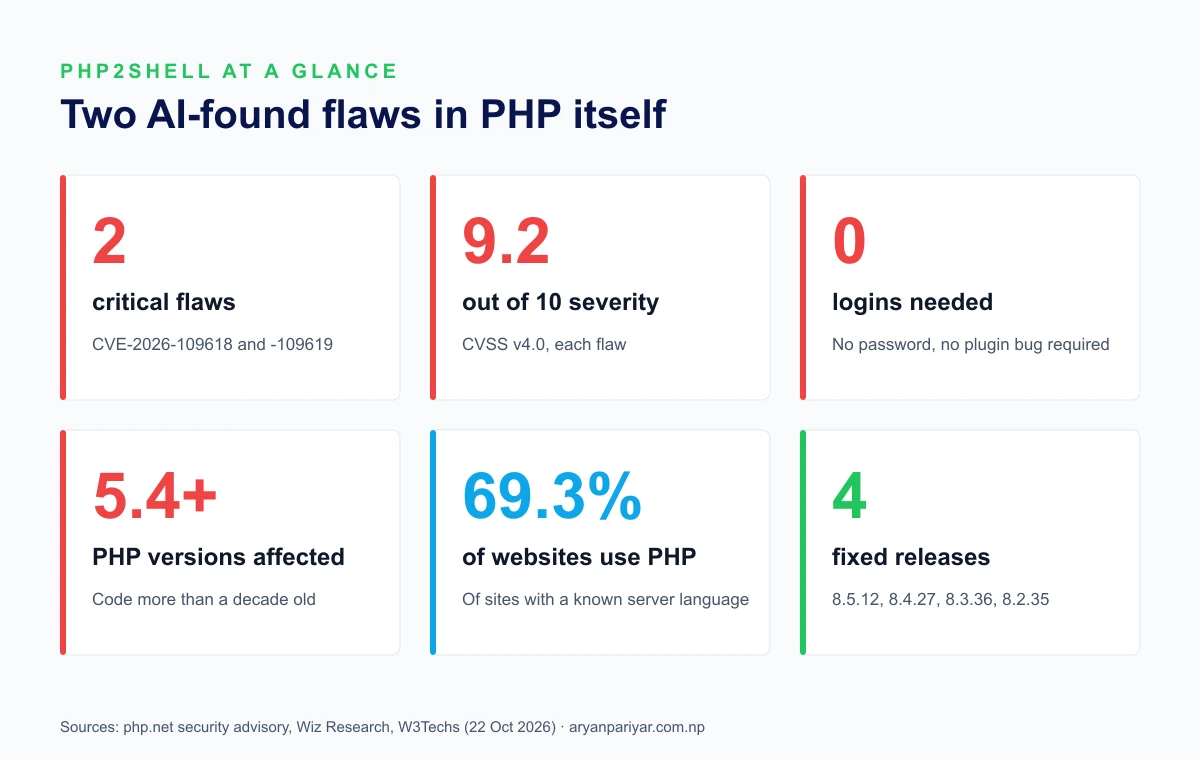
Quick answer: PHP2Shell is two critical vulnerabilities in PHP itself, CVE-2026-109618 and CVE-2026-109619, each rated 9.2 out of 10. An attacker can run their own code on a web server without logging in and without any plugin bug. They were found with the help of AI tools from OpenAI and Google, and fixed on 21 October 2026. The fix is to update PHP to 8.5.12, 8.4.27, 8.3.36 or 8.2.35. Updating WordPress or plugins does not fix it.
छिटो उत्तर (नेपालीमा): PHP2Shell भनेको PHP भाषामै भेटिएका दुईवटा गम्भीर सुरक्षा त्रुटि हुन्, जसको कारण नेपालका .gov.np सरकारी वेबसाइटहरू अस्थायी रूपमा बन्द गरिए। तपाईंको वेबसाइट PHP मा चल्छ भने (धेरैजसो WordPress साइटहरू PHP मै चल्छन्), आजै PHP लाई 8.3.36, 8.4.27 वा 8.5.12 मा अपडेट गर्नुहोस्। WordPress वा प्लगइन मात्र अपडेट गरेर यो समस्या हट्दैन।
I'm Aryan Pariyar, a web developer in Nepal. Most of the websites I've built run on PHP, and the WordPress backend behind this very site does too, so this guide is the checklist I'm working through myself. Every fact below links to its source, mostly the official PHP advisory and the researchers who found the flaws.
What is PHP2Shell?
PHP is the language behind most of the web. W3Techs counts it on 69.3% of websites whose server-side language is known (W3Techs, 22 October 2026), including every WordPress site. PHP2Shell is a set of bugs in PHP's own engine, so it affects websites regardless of which app or plugins they run.
The official PHP security advisory describes the two flaws like this:
- CVE-2026-109618, memory corruption on out-of-memory: running out of memory can interrupt PHP while the data for a request is only partly set up, and the cleanup afterwards treats that broken data as valid.
- CVE-2026-109619, stale state between requests: data that belonged to one request can survive after its memory is freed, and the next request handled by the same PHP worker can use it.
Think of a hotel room that isn't cleaned between guests. One visitor deliberately makes a mess by forcing PHP to run out of memory, and the next request walks into whatever they left behind. Researchers at Wiz showed this can be turned into full control of the server. They found four separate bugs grouped under the two CVEs, touching the upload-progress feature, session IDs, error backtraces and OPcache.
Three things make it unusually serious:
- No login needed. The attack works on public pages.
- No vulnerable plugin needed. Wiz says even a simple "Hello World" page on an affected PHP version can be vulnerable.
- Almost every version is affected. Wiz found the issues in releases dating back to PHP 5.4, in code more than a decade old.
PHP lists every common setup as at risk: PHP-FPM, Apache with mod_php, php-cgi, FrankenPHP and LiteSpeed. It rates mod_php highest, with a demonstrated attack that runs before any of the website's own code.
How AI found a bug humans missed for over a decade
Two teams found the flaws independently, both using AI:
- Calif, a security research firm working with OpenAI under its "Patch the Planet" program, reported the first flaw to PHP on 11 August 2026, using OpenAI's GPT-5.6 Sol model.
- Wiz Research found the flaws on 19 August using its own Wiz Atlas research tool together with Google's Gemini 4 Argon and OpenAI's GPT-5.6 Sol. Wiz confirmed working attacks against Drupal on 20 August and WordPress on 21 August, then reported to PHP on 24 August.
Wiz credits AI with helping to find the bug, build and adapt the exploit to different PHP versions, detect attacks, and check the patch. The bugs sat in rarely exercised error paths, the kind of place human reviewers seldom look and automated tools can test endlessly. It's a preview of security work to come: AI is now finding serious bugs faster, and the same tools are available to attackers, which makes updating quickly matter more than ever.
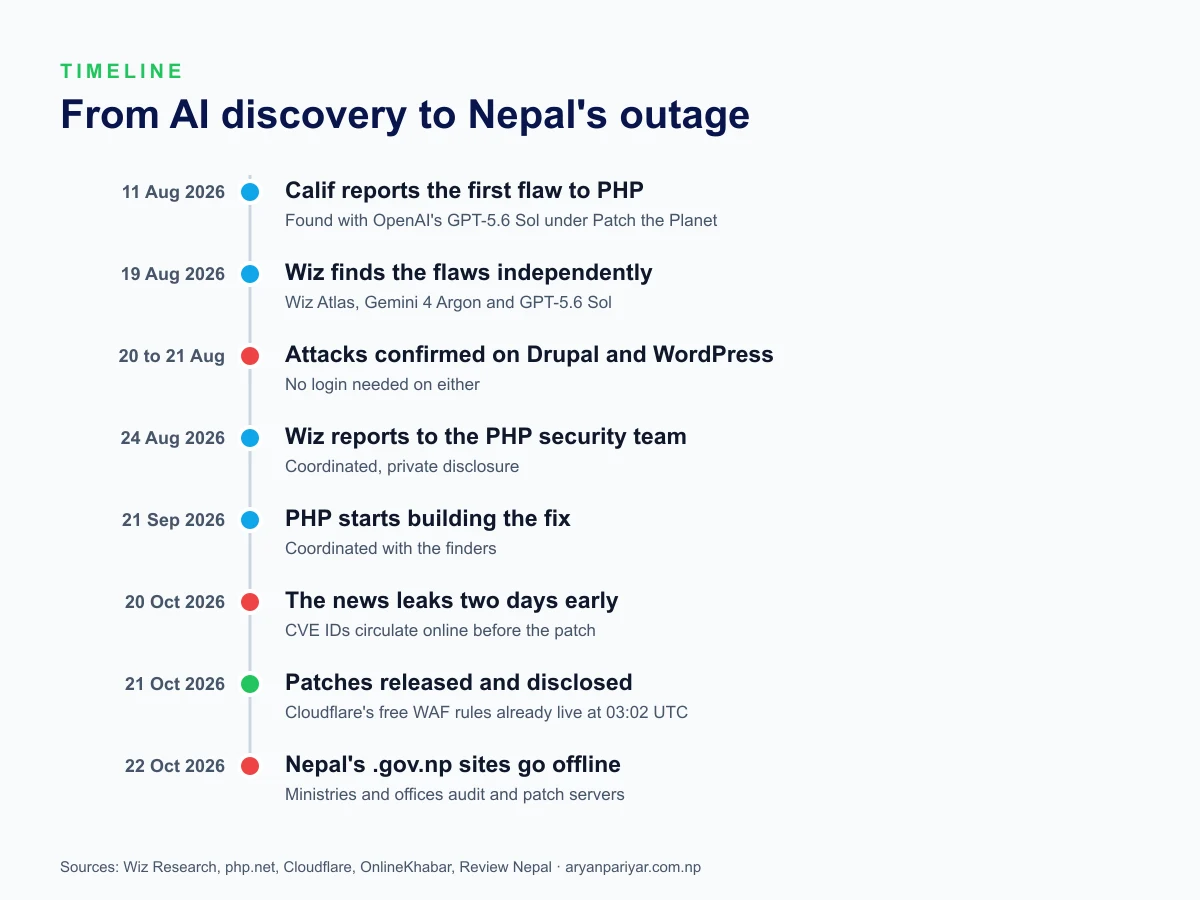
The plan was a coordinated release, but news of the flaws leaked online on 20 October, before the fix was public. PHP published the patched versions on 21 October. Security firms including watchTowr and Patchstack reported exploitation attempts and incidents shortly after.
Why Nepal's government websites went offline
On the morning of Thursday 22 October 2026, Nepal's .gov.np websites stopped opening, including the Office of the President, the Office of the Prime Minister, several ministries and municipalities (OnlineKhabar). According to Review Nepal, authorities were auditing government IT systems to confirm the servers were updated before bringing services back. Officials had not said whether any data was compromised, so the shutdown may have been precautionary.
Nepal wasn't alone. Finland temporarily took government web services offline, and the Netherlands' cybersecurity agency took its own website down. The US cybersecurity agency CISA advised organizations that can't update right away, or that still run PHP 8.1 or older, to take PHP-based systems offline until they're patched. Going dark for a day is the safe choice when you can't confirm every server is fixed.
Are you affected?
| Your website | Affected? | What to do |
|---|---|---|
| WordPress, WooCommerce, Drupal, Joomla, Magento | Yes, if PHP isn't a fixed version | Update PHP through your host |
| Laravel, CodeIgniter or custom PHP | Yes, the framework doesn't matter | Update PHP on the server |
| Next.js, React or a static site with no PHP | No | Check any PHP backend it talks to |
| Headless WordPress behind a Next.js site | Yes, the WordPress backend | Update PHP on the WordPress server |
| PHP 8.1, 8.0, 7.x or older | Yes, with no official update | Move to PHP 8.3 or 8.4 now |
Which PHP versions are vulnerable, and which are safe?
Find your PHP version in the table below. The ranges come straight from PHP's official security advisories for both CVEs (GHSA-w8hw-w9fx-j79w and GHSA-6wmf-4rv5-p3rp), which list exactly the same versions. Every release below the fixed number in its branch is vulnerable.
| PHP branch | Vulnerable | Safe (fixed) | What to do |
|---|---|---|---|
| 8.5 | 8.5.0 to 8.5.11 | 8.5.12 or newer | Update to 8.5.12 |
| 8.4 | 8.4.0 to 8.4.26 | 8.4.27 or newer | Update to 8.4.27 |
| 8.3 | 8.3.0 to 8.3.35 | 8.3.36 or newer | Update to 8.3.36 |
| 8.2 | 8.2.0 to 8.2.34 | 8.2.35 or newer | Update to 8.2.35, then plan a move to 8.3 or 8.4 before 8.2 ends on 31 December 2026 |
| 8.6 (pre-release) | Builds before 8.6.0 RC4 | 8.6.0 RC4, test use only | Don't run pre-releases on a live site |
| 8.1 | All versions | No official release | Move to 8.3 or 8.4 |
| 8.0 | All versions | No official release | Move to 8.3 or 8.4 |
| 7.4 | All versions | No official release | Move to 8.3 or 8.4 |
| 7.3 down to 5.4 | All versions, according to Wiz Research | No fix of any kind | Move to 8.3 or 8.4 now, or take the site offline |
For PHP 7.4, 8.0 and 8.1, PHP's security team published minimal source patches. Those are for Linux distributions and hosting companies building their own fixed versions, not something a site owner installs. For your website, the real fix on these versions is moving to PHP 8.3 or 8.4.
Your host's version number can differ from the official one. Ubuntu, Debian, Red Hat, CloudLinux and managed hosts often patch their own PHP build without changing the number, and some managed hosts block the attack at their platform before the update reaches your site. So if your version shows as vulnerable in this table, don't panic and don't guess: contact your hosting company or platform today, and ask them to confirm in writing that your PHP build includes the fix for CVE-2026-109618 and CVE-2026-109619.
How to check your PHP version
- WordPress: go to Tools, then Site Health, then the Info tab, and open Server. The PHP version is listed there.
- cPanel: open Select PHP Version or MultiPHP Manager in the Software section.
- Hostinger: open your website in hPanel and go to PHP Configuration.
- Your own server: create a temporary page containing
<?php phpinfo();, open it, note the version, then delete the page.
Two traps. First, php -v on the command line can show a different version from the one actually serving your website, so check what the web server uses. Second, Linux distributions often patch PHP without changing the version number, so an Ubuntu or Debian server can show an older number and still be fixed. In that case, check your distribution's security notice for the package version that includes the fix.
How to fix PHP2Shell, step by step
WordPress on shared hosting, cPanel or Hostinger
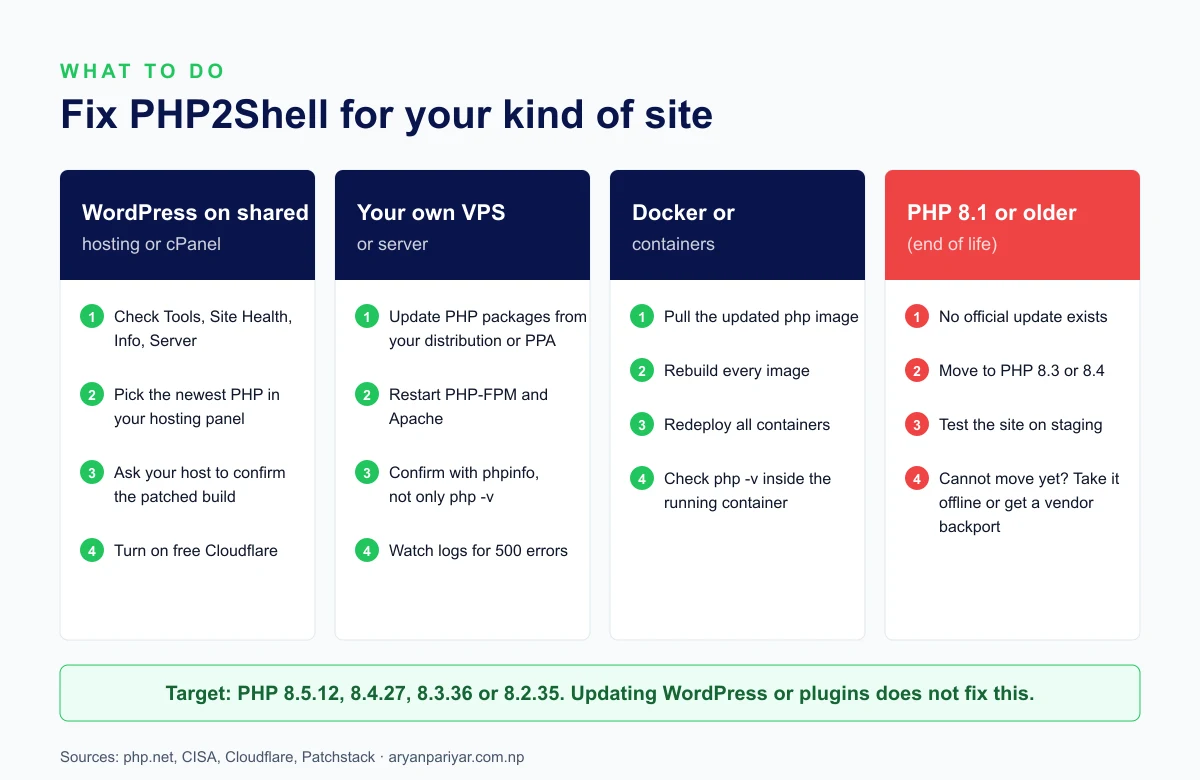
This is how most business websites in Nepal are hosted, and here your hosting company patches PHP itself. Your job is to make sure your site is on a current version and that the host has applied the fix:
- Check your PHP version as above.
- If you're on PHP 8.1 or older, switch to 8.3 or 8.4 in your hosting panel. Take a backup first, and test the site afterwards.
- Ask your host to confirm that the fixed build is installed. You can send this:
Hello, please confirm that the PHP version serving my website (yourdomain.com.np) includes the fix for CVE-2026-109618 and CVE-2026-109619 (PHP2Shell), meaning PHP 8.5.12, 8.4.27, 8.3.36, 8.2.35 or a patched build from your provider. Thank you.
While you wait, putting your site behind the free Cloudflare plan adds a layer of protection, covered below.
Your own VPS or server (Ubuntu or Debian)
Update PHP from your distribution or the PPA you installed it from, then restart every PHP process so no old worker stays running:
sudo apt update
sudo apt upgrade
sudo systemctl restart php8.3-fpm    # use your version: php8.2-fpm, php8.4-fpm...
sudo systemctl restart apache2       # or: sudo systemctl restart nginx
Then confirm the version your website actually uses, with a phpinfo page, not only php -v. On Red Hat, AlmaLinux or Rocky servers, use sudo dnf upgrade and check that your PHP repository has published the fix. Patchstack noted that one popular volunteer-run repository didn't have updates on release day.
Docker and containers
Pull the updated official PHP image, rebuild every image that uses it, and redeploy all containers. A running container keeps its old PHP until it's replaced. Confirm with docker exec yourcontainer php -v, and remove the old images so nothing restarts from them.
Laravel, CodeIgniter and custom PHP
Your code doesn't need changing. The fix is the PHP runtime underneath, so follow the server or Docker steps above, or ask your host. If you manage the server through a panel like Laravel Forge or Ploi, update PHP there or through the server's package manager, then restart PHP.
PHP 8.1 or older
PHP 8.1 and older no longer get official updates, although some Linux distributions and long-term support vendors offer backported fixes. The real fix is moving to PHP 8.3 or 8.4. Older WordPress plugins and custom code can break on a newer PHP, so test on a staging copy first. If you can't move yet, CISA's advice is to take the site offline until you can. Note too that PHP 8.2 reaches end of life on 31 December 2026, so plan your move to 8.3 or 8.4 now.
If you can't update today
None of these makes a site safe on its own. PHP says plainly that "updating is the only safe choice". They do lower the risk for a short time:
- Turn on Cloudflare. Cloudflare deployed rules against PHP2Shell at 03:02 UTC on 21 October, about nine hours before disclosure, and free plan customers are protected automatically (Cloudflare). Paid plans should check their managed ruleset is set to block.
- Apply PHP's interim settings (server administrators only). PHP's advisory lists these. They must go in php.ini, the PHP-FPM pool or the server configuration, not in
.user.iniorini_set(), and every PHP worker must be restarted afterwards:
session.upload_progress.enabled = 0
post_max_size = 8M          ; 32M if you need uploads, keep upload_max_filesize below it
memory_limit = -1           ; only with a container or cgroup memory limit in place
fatal_error_backtraces = 0 ; PHP 8.5 only- Use maintenance mode or go offline for high-risk sites, such as online stores and anything holding customer data, until PHP is updated.
Be wary of "PHP2Shell fix" plugins and copy-pasted snippets. Patchstack warns they're unverified and can break sites. A plugin can't patch the PHP engine running underneath it.
After updating: check for signs of an attack
Because the flaws can leak server memory, a site that was exposed before you patched may hold stolen secrets. Wiz and CISA list these warning signs:
- Unusual multipart (upload) requests followed by memory-limit errors or bursts of HTTP 500 errors.
- Unusually large or malformed
PHPSESSIDcookies in responses. - PHP worker processes restarting for no clear reason, or launching shells and downloading tools.
If you see any of these, treat the server as compromised. Rotate the database password, WordPress salts, API keys and any other credentials stored on it, scan for unknown files and admin users, and restore from a clean backup if needed. Small business sites without someone watching the logs are exactly where a breach goes unnoticed for months.
What this means for websites in Nepal
Most business websites in Nepal run on WordPress with shared hosting, so this is mostly your host's job. But the outage exposed two common problems. Scans after disclosure found a large share of internet-facing PHP servers still on versions past end of life, which get no fix at all. And many owners don't know which PHP version their site uses, or who to call when something like this happens.
Three habits prevent most of it: keep PHP on a supported version, keep a tested backup, and know who is responsible for your server. If that isn't clear for your site, my website maintenance plans cover updates, tested backups and security monitoring, and work for sites I didn't build. For a quick check of your site's speed and setup, try the free website speed checker, and read how WordPress sites get hacked for the wider security basics.
Frequently asked questions
What is PHP2Shell?
PHP2Shell is the name for two critical vulnerabilities in the PHP language itself, CVE-2026-109618 and CVE-2026-109619, each rated 9.2 out of 10. They let an attacker run their own code on a web server without logging in, by triggering an out-of-memory crash that leaves stale data behind for the next request. They were found with the help of AI and patched on 21 October 2026.
Which PHP versions are vulnerable to PHP2Shell?
According to PHP's official advisories, every release below the fixed version in its branch: PHP 8.5.0 to 8.5.11, 8.4.0 to 8.4.26, 8.3.0 to 8.3.35 and 8.2.0 to 8.2.34. All versions of PHP 8.1, 8.0 and 7.4 are vulnerable with no official fixed release, and Wiz Research found the bugs in releases back to PHP 5.4. Hosting companies sometimes patch their own builds without changing the number, so ask your host to confirm.
Which PHP versions fix PHP2Shell?
PHP 8.5.12, 8.4.27, 8.3.36 and 8.2.35, released on 21 October 2026. PHP 8.1 and older get no official update, so sites on those versions need to move to a supported version or get a backported fix from their Linux distribution or hosting provider.
Does updating WordPress fix PHP2Shell?
No. The flaws are in PHP, the language WordPress runs on, not in WordPress or its plugins. Updating WordPress, themes or plugins is still good practice, but only updating PHP to a fixed version closes PHP2Shell.
Is my WordPress site affected by PHP2Shell?
If it runs on any PHP version older than the fixed releases, very likely yes. Wiz Research confirmed attacks against the latest WordPress, Drupal and Joomla without a login or a vulnerable plugin. Check your PHP version in Tools, Site Health, Info, Server, then update it in your hosting panel.
How do I check my website's PHP version?
In WordPress, open Tools, then Site Health, then the Info tab, and look under Server. On cPanel, open Select PHP Version or MultiPHP Manager. On Hostinger, open your website in hPanel and find PHP Configuration. On your own server, check a phpinfo page, because php -v on the command line can report a different version from the one serving your site.
Does Cloudflare protect against PHP2Shell?
Cloudflare deployed WAF rules against PHP2Shell at 03:02 UTC on 21 October 2026, and free plan customers are protected automatically. Cloudflare itself says this is an extra layer, not a fix, so you still need to update PHP.
Why were Nepal's government websites down in October 2026?
On 22 October 2026, .gov.np websites including the Office of the President, the Office of the Prime Minister, ministries and municipalities were taken offline after the PHP2Shell patches were released, while authorities audited servers and confirmed updates. Officials had not said whether any data was compromised.
Was PHP2Shell exploited by attackers?
Yes, attempts were seen. The details leaked online on 20 October, a day before the patch, and security firms including watchTowr and Patchstack reported exploitation attempts and incidents shortly after disclosure. That is why waiting to update is risky.
PHP2Shell के हो र यसबाट कसरी बच्ने?
PHP2Shell भनेको PHP भाषामै भेटिएका दुईवटा गम्भीर सुरक्षा त्रुटि (CVE-2026-109618 र CVE-2026-109619) हुन्, जसले लगइन बिना नै सर्भरमा आफ्नो कोड चलाउन दिन सक्छ। यिनलाई AI को सहयोगमा भेटिएको हो र २१ अक्टोबर २०२६ मा सुधार गरिएको हो। बच्नका लागि आफ्नो वेबसाइटको PHP लाई 8.5.12, 8.4.27, 8.3.36 वा 8.2.35 मा अपडेट गर्नुहोस्। WordPress वा प्लगइन मात्र अपडेट गर्दा यो समस्या समाधान हुँदैन।
PHP2Shell is a warning about the years ahead as much as a bug: AI is finding old flaws faster than ever, for defenders and attackers alike. The sites that come through are the ones that can update in hours, not weeks.

Aryan Pariyar
Web developer in Nepal, working with global companies across the Netherlands, UK and Australia. 100+ websites shipped, AI ad creatives generating thousands of sales, and 1,000+ students trained.
More about me →Have a project in mind?
Let's turn your idea into something premium.

Let's build it together!
Contact NowNot sure where to start?
Tell me about your project and I'll get back within 24 hours.